

官方文档与源码地图
主线位置:导读 —— 把官方文档 https://typst.app/docs/ 的目录树与
typst0.15.1 工作区的 18 个 Rust crate 对上号。
很多读者打开 https://typst.app/docs/ 时容易迷失在数百个函数页面里。其实整个官方文档库就存放在开源仓库的 docs/content/ 目录下(连官网文档本身都是用 Typst 语言写的 .typ 文件!),并且严格对应着编译器内部的模块划分。
1. 官方文档(typst.app/docs)四大板块与本卷映射
| 官方文档板块 | 仓库路径(docs/content/) | 解决什么问题 | 对应本卷章节 |
|---|---|---|---|
| Tutorial(入门教程) | tutorial/1-writing.typ .. 4-template.typ | 从零写出第一篇论文、加样式、封装复用模板 | 01-overview、02-syntax-vs-md-latex、10-hands-on |
| Guides(专题指南) | guides/for-latex-users.typ、page-setup.typ、tables.typ、accessibility.typ | LaTeX 用户速查、页面页眉设置、复杂表格、PDF 无障碍 | 04-page-and-layout、06-tables-figures-bib、09-export-and-ecosystem |
| Reference · Language(语言参考) | reference/language/syntax.typ、styling.typ、scripting.typ、context.typ | 三模式语法、#set/#show、变量/函数/循环、context 上下文 | 02-syntax-vs-md-latex、03-styling-rules、07-scripting-and-data、08-context-and-introspection |
| Reference · Library & Export(标准库与导出) | reference/library/{foundations,model,text,math,layout,visualize,introspection,data-loading}.typ + export/*.typ | 所有内置类型、排版元素、数学符号、自省查询与 PDF/SVG/HTML 导出参数 | 04 至 09 各章 |
2. 编译五阶段流水线与 18 个工作区 Crate
当你运行 typst compile doc.typ 时,源码在内部经历了 Parse(语法解析)→ Eval(求值成内容树)→ Realize(应用样式与 show 规则展开)→ Layout(分页与盒模型布局)→ Export(生成目标文件) 五个阶段。
crates/typst/src/lib.rs:74-194
pub fn compile<T>(world: &dyn World) -> Warned<SourceResult<T>>
where
    T: Output,
{
    let mut sink = Sink::new();
    let output = compile_impl::<T>(world.track(), Traced::default().track(), &mut sink)
        .map_err(deduplicate);
    Warned { output, warnings: sink.warnings() }
}
工作区 crates/ 下的 18 个 crate 按职责分为四层:
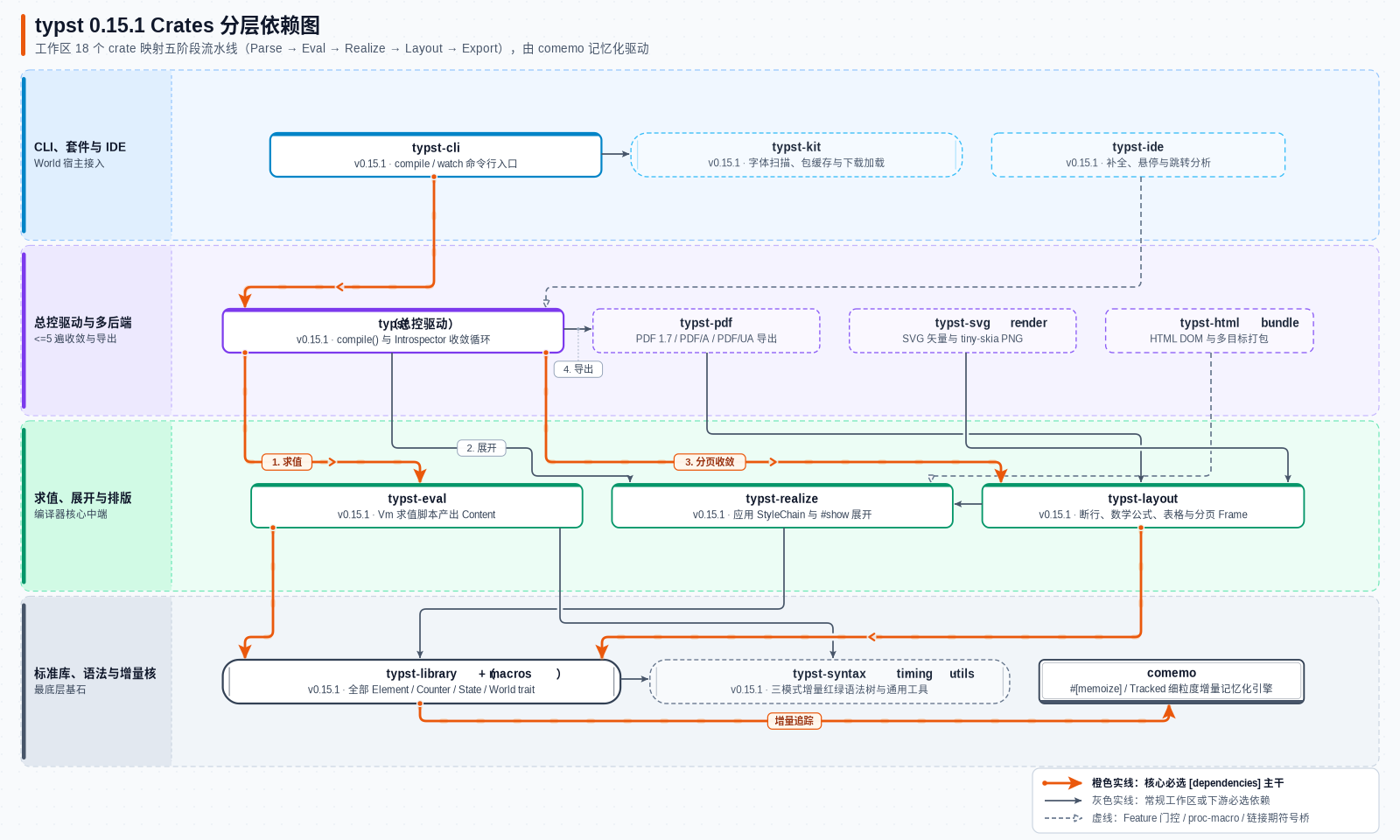
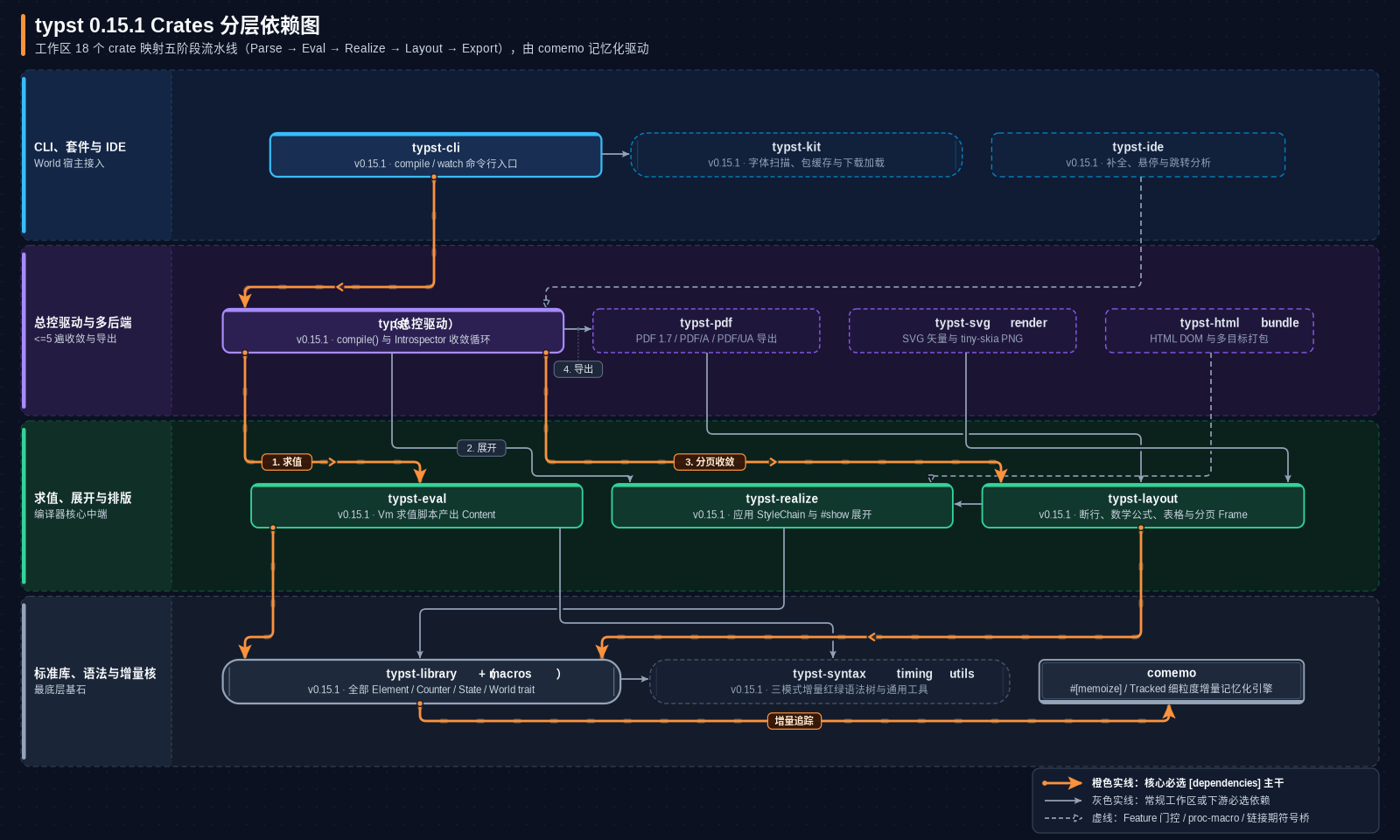
| Crate | 核心入口与类型 | 一句话职责 |
|---|---|---|
typst-syntax | Lexer、SyntaxMode、SyntaxNode、ast::Expr | 维护 Markup/Math/Code 三种词法模式,生成可增量重解析(reparse)的红绿语法树 |
typst-eval | eval()、Vm、Scopes | 求值 #let、#import、for/if 与标记块,产出不可变的 Module 与 Content 树 |
typst-library | Content、StyleChain、Counter、State、Introspector | 定义所有文档元素(HeadingElem、ParElem、EquationElem 等)与自省接口 |
typst-realize | realize()、Verdict、GroupingRule | 把任意嵌套的 Content 和用户 #show 规则展开为布局器认识的标准元素序列,合并连续文本成段落 |
typst-layout | layout_document()、PagedDocument、Frame | 计算行内断行、数学公式盒尺寸、网格表格与分页,产出每页带绝对坐标的 Frame |
typst-pdf / svg / render / html | pdf()、svg()、render()、html_document() | 将布局好的 PagedDocument(或 HtmlDocument)编码为最终文件格式 |
typst | compile()、trace() | 串联 eval 与最多 MAX_ITERS(5 次)的布局自省收敛循环 |
📝NOTE
冷知识:连官网文档都是 Typst 编译出来的
如果你查看 docs/src/main.rs,会发现 https://typst.app/docs/ 并不是用 Markdown 生成的静态网站,而是直接用 Rust 驱动 typst 编译器读取 docs/content/**/*.typ,同时结合 Rustdoc 提取 typst-library 中每个 #[elem] 和 #[func] 宏上的文档注释,在构建期直接渲染出网页 HTML 与示例预览图。这保证了官网文档里的每一段示例代码都经过了当前版本编译器的真实求值。
小结
- 查语法与语言机制看
Reference -> Language(对应typst-syntax、typst-eval、typst-realize);查具体排版元素看Reference -> Library(对应typst-library与typst-layout)。 - 下一部分(
01-overview)我们直接用同一份技术报告,让 Markdown、LaTeX 与 Typst 同台竞技。
💬 关联讨论
加载中...